
Rolling Admissions: How do schools display in this Admission.org Search filter?
The Admission.org Search's Rolling Admissions filter enables prospective families to identify independent schools that are actively accepting applications, reviewing them promptly, and making decisions within a short timeframe.
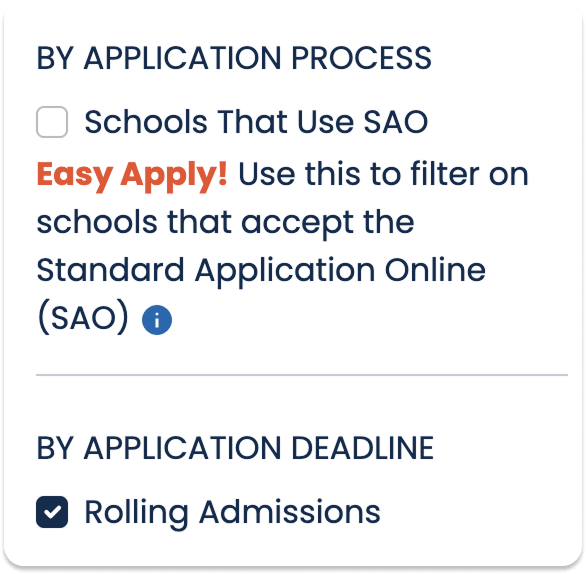
This feature replaces the previous "Still Accepting Applications" filter, providing more flexibility for schools and greater clarity for families searching.
Schools have two profile settings that control whether they display in the Rolling Admissions search results year-round or only display after a set application deadline.
These settings are available in the administrative editing view of the school's profile, in the Applying section.
Rolling Admissions Year-Long
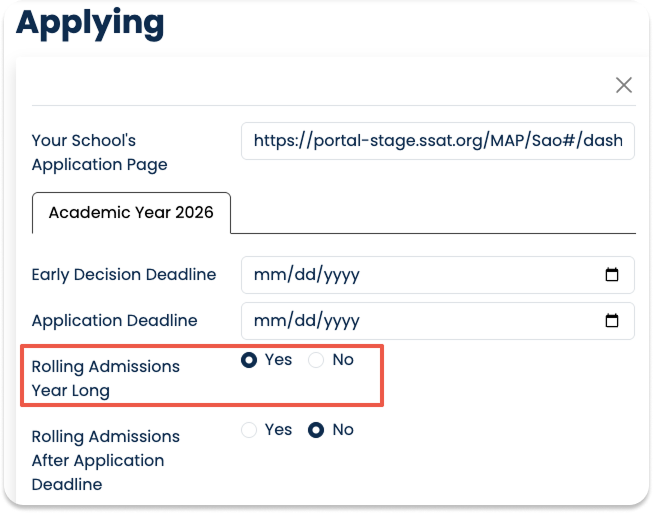
The set-it-and-forget-it option for schools that conduct rolling admissions throughout the entire admissions year until reaching enrollment capacity. Setting this option will display the school in the Rolling Admissions search results from August 1 through July 31.
If your school reaches capacity before July 31, you can change the setting to "No" to stop it from appearing in the Rolling Admissions results; however, you should set a reminder to reset it to "Yes" on August 1 for the new admissions year.
When using this option, you can keep the Application Deadline field blank.
Rolling Admissions After Application Deadline
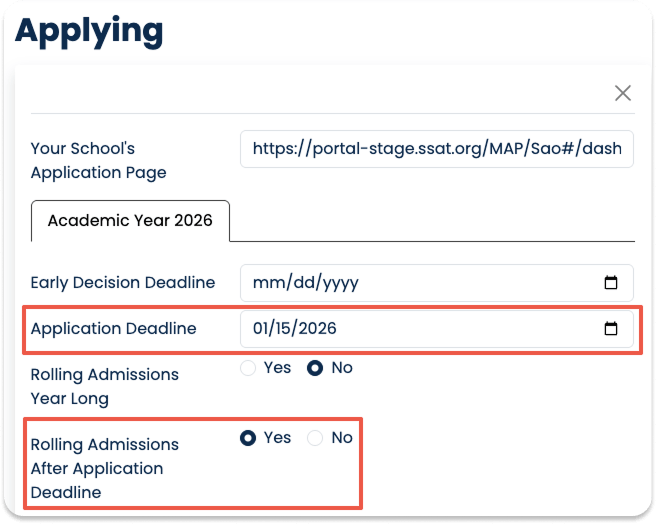
This option displays schools in the Rolling Admissions search results after the date set in the Application Deadline field, up to July 31, unless the school deactivates the filter before then.
Please note that the system resets on August 1, automatically removing the school from the Rolling Admissions search results, and the school will need to update its Application Deadline date for the new admissions year.
Schools can activate the Rolling Admissions After Application Deadline option at any point in the admissions year. For example, a school with a January 15 application deadline can activate the filter in April if seats remain open after the admissions decisions period.
What happens if both rolling admissions options are set?
In this scenario, the application deadline will display on the school's profile, and the school will display in the Rolling Admissions search results for the full year.
